Access your incoming eInvoices from any browser
Our web application connects you with the Serbian SEF portal — view, print, approve or reject incoming invoices from any device, with no installation. It also alerts you when a supplier raises a price and shows you analytics across your whole purchasing. Try it free for 14 days.
Everything you need to manage incoming invoices
View all incoming invoices
Every invoice arriving from the SEF portal is immediately available in a clear interface — with filters by supplier, date, status and amount.
Approve or reject in one click
Review the invoice, check the items and decide — your approval or rejection is sent to SEF in real time.
Print and download
You can print or download any invoice as a PDF for your archives or accountant.
Work from any device
Browser on a computer, phone or tablet — no installation, no Windows lock-in, no VPN.
Sending outgoing invoices through the web app is in development and will be added soon.
Spot a price rise the same day, not at stocktake
SEF shows you the invoices. We show you what changed inside them.
A supplier raises the price of flour by thirteen percent. The invoice arrives, gets posted, gets paid — like every other one. Three months later you notice the margin is not what it was, but you have no idea what went up, or when.
Every invoice arriving from SEF is automatically compared against earlier prices for the same items. If the difference exceeds a threshold you set yourself, you get an email — without starting anything, and without anyone checking by hand.
It catches the quiet increases too
Beyond comparing against the previous invoice, the total change over a longer period is tracked as well. Three separate rises of four percent trigger no individual alert — but over six months that is fifteen percent, and you will see it.
You set the threshold
Choose the percentage at which you want to be notified — five, ten, whatever suits you. It is changed in account settings, at any time, without going through us.
Matched by code, not by name
Items are identified by the supplier's item code and by barcode. A name on an invoice can be shortened, altered or written differently — a code cannot.
Services are covered as well
If your services carry codes, they are compared too. Rent, maintenance, transport — anything that repeats month after month.
The email says everything
Supplier and tax number, invoice number and date, the item with its code, old and new unit price excluding VAT, the date of the old price and the percentage increase. Plus a button that opens that exact invoice.
Something to negotiate with
When you know exactly what went up, by how much and since when, you negotiate with figures rather than impressions.
This is what the portal does not do. SEF delivers you a document — what it says, and what changed in it, is left to you.
Price monitoring is part of the web application at efakture.gart.rs.
The invoices you already received, added up into a picture
A hundred and eighty-four invoices from fifteen suppliers over six months. One at a time, each is just a cost that gets paid and forgotten. Gathered in one place, they are a picture of your business — who takes the most of your money, where purchasing actually goes, and how that has shifted over time.
The portal reads it all from invoices that have already arrived through SEF. No extra data entry, no imports, no retyping.
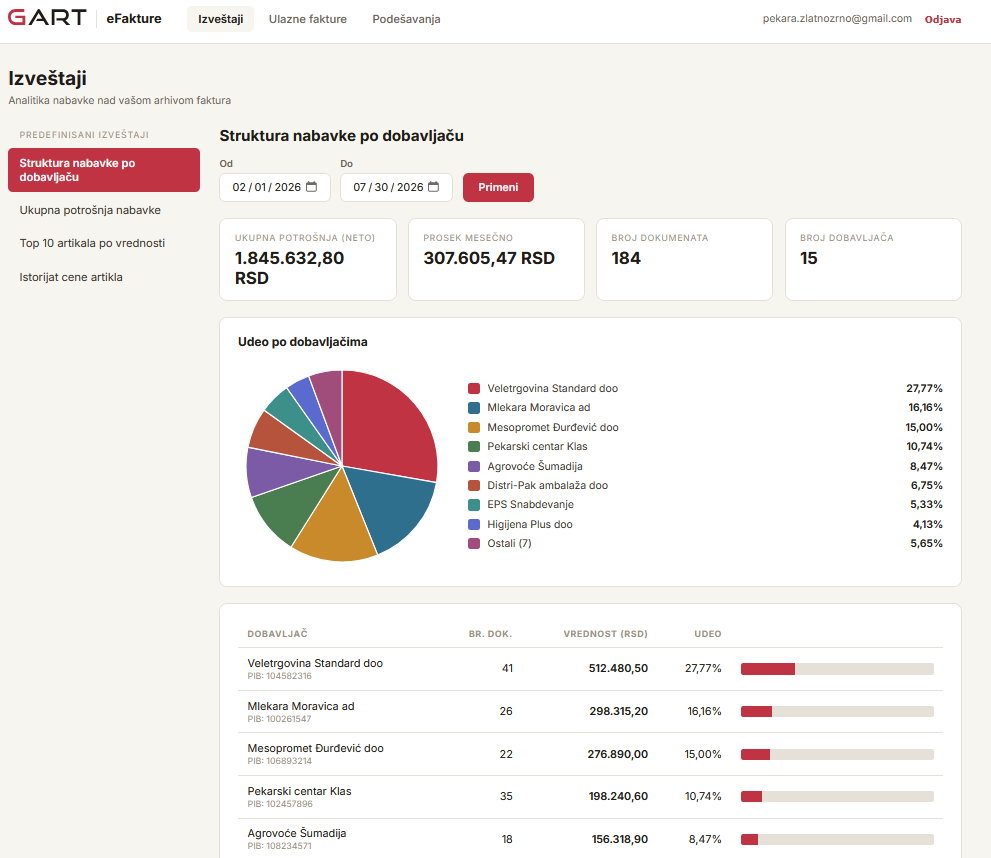
Purchasing structure by supplier — total spend, monthly average and each supplier's share
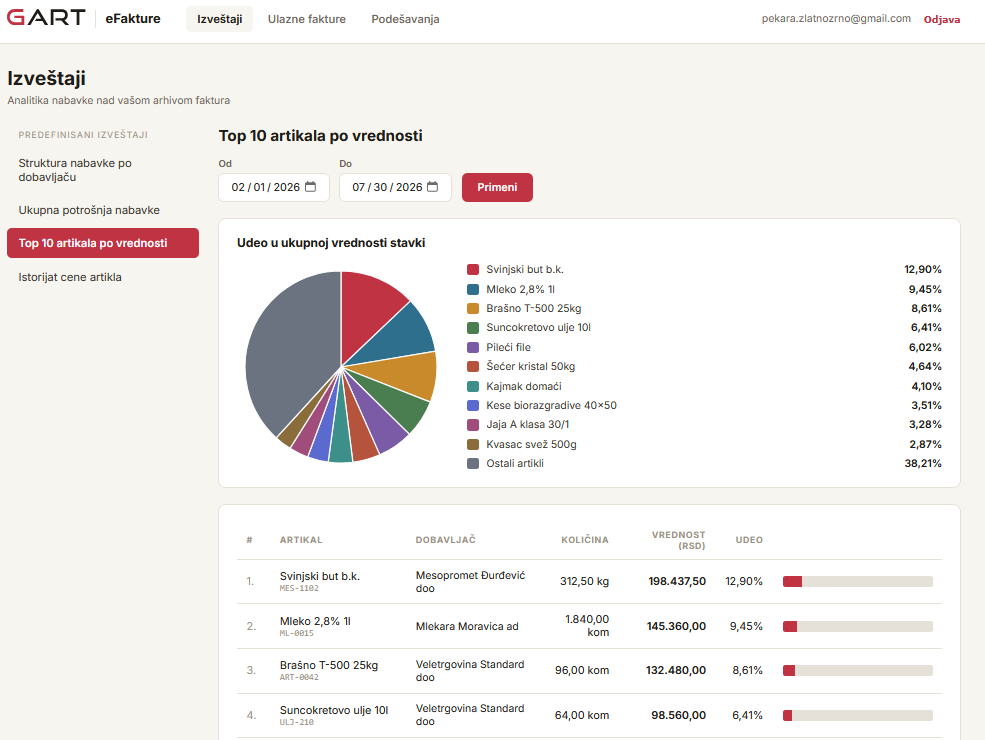
Top 10 items by value — where the money actually goes, by item and supplier
Purchasing structure by supplier
Who accounts for how much of your total purchasing, with document counts and tax numbers. It shows immediately when one supplier holds a third of your costs — and that is a figure you negotiate with differently.
Top 10 items by value
Not by quantity, but by where the money goes. It is rarely what you would list from memory — and that is exactly where the savings tend to be.
Total purchasing spend
Net amount, monthly average, number of documents and number of suppliers, for any period you choose.
Item price history
How the price of a single item moved over time and across every supplier you bought it from. You see who raised prices, and who was cheaper.
This is no longer a nicer view of SEF. It is a level of insight into purchasing that a small venue does not normally have — because getting it otherwise means an accountant, or someone retyping invoices into a spreadsheet.
Why this, and not just the SEF portal
The portal delivers, we interpret
SEF is free and does its job — it hands you the document. What that document says, what changed in it and where your money is going is where the portal stops.
Cheaper than having a person do it
The same insight otherwise takes someone retyping invoices into a spreadsheet every month, or an accountant who charges for it separately.
Works without the Gart program
The web application stands alone. You do not have to change your till, your software vendor or the way you work in order to use it.
Nothing to install
Open a browser on a computer, phone or tablet, sign in and work. No Windows lock-in and no VPN.
We know the rules because we grew up here
25+ years with Serbian fiscalisation and SEF. When the regulations change, you do not hear it from us late.
Try before you pay
14 days free, no contract and no commitment. If two weeks do not show you something you did not already know, you have lost nothing.
Two ways to use it
As part of Gart software
If you use Gart Caffe, Restaurant or Trade — eInvoicing is already included in the monthly price. Sending, receiving and automatic inventory posting.
Standalone via browser
A separate web application at efakture.gart.rs for businesses that only need incoming invoice management, without the Gart POS system. 14 days free, no commitment.
Ready to get started?
Open a free 14-day account for the web app and start managing your incoming invoices right away. No installation, no contract, no commitment.