Software for restaurants and food-serving venues
All café features plus a kitchen module — two-way communication with the bar, production through recipes, and real-time ingredient control. Plus an order number system, a pickup display, and delivery with a separate price list per channel.
From order to service without missteps
Fast touch-screen register
Categories, items and tables organized for the fastest checkout. Support for split bills and transfers between tables.
Two-way kitchen communication
Orders arrive directly on the kitchen display, and the kitchen sends back statuses — in preparation, ready to serve.
Recipes for dishes and beverages
Each dish is linked to raw ingredients and semi-finished products. Production and sales automatically deduct stock.
Real-time inventory and purchasing
Overview of current stock, minimum levels, purchase suggestions and tracking of deliveries from suppliers.
Cost tracking and reporting
All costs in one place, revenue per shift, sales by item, comparative reports and margins.
Support for additional devices
KDS screens in the kitchen, printers at multiple stations (bar, cold kitchen, hot kitchen), handheld waiter terminals.
Take orders on a phone, right at the table
The waiter takes the order where the guest is — on the terrace, upstairs, in a detached seating area — and enters it on their phone. No more walking back to the till to retype everything from memory. It all runs in a browser, on any device on the network: Android, iPhone, tablet, laptop.
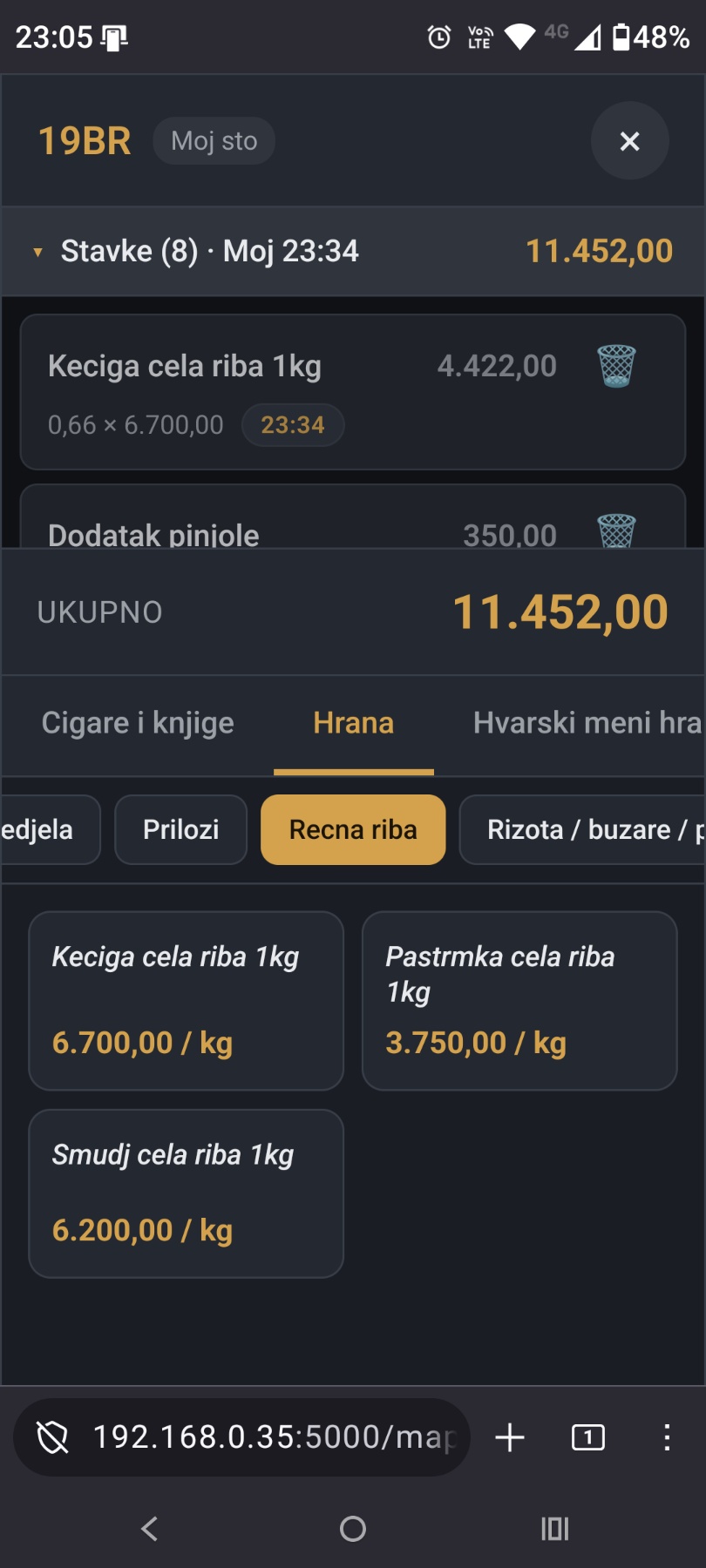
The web POS on a waiter's phone — an open table, its items and the menu by category
Runs on anything with a browser
The device and operating system do not matter. Nothing is installed — the waiter opens the address and signs in with their own account.
The same table map as the till
Sections and table layout are taken from your existing floor plan. The waiter is not learning a new system — they see what they already know.
Orders move on immediately
As soon as it is sent, the order prints on the POS printers in the kitchen and at the bar — or lands on the kitchen and bar displays, if you use them.
Prices are calculated on the server
Different prices per section — terrace, dining room, delivery — are applied automatically. The waiter cannot get a price wrong, because they never enter one.
Every waiter has their own account
Sign-in is personal, so it is always clear who entered what. The rules for deleting items work exactly as they do at the till.
Runs alongside your existing till
Nothing changes in the system you already use. The till at the bar keeps working as before — phones are simply an additional entry point.
Orders on screen, in real time, on any device
The waiter enters an order and it appears on the kitchen and bar screens within a second. Everything runs in a browser — a cheap Android tablet is enough, instead of an expensive Windows machine with a touch monitor. Same system, a fraction of the hardware cost.
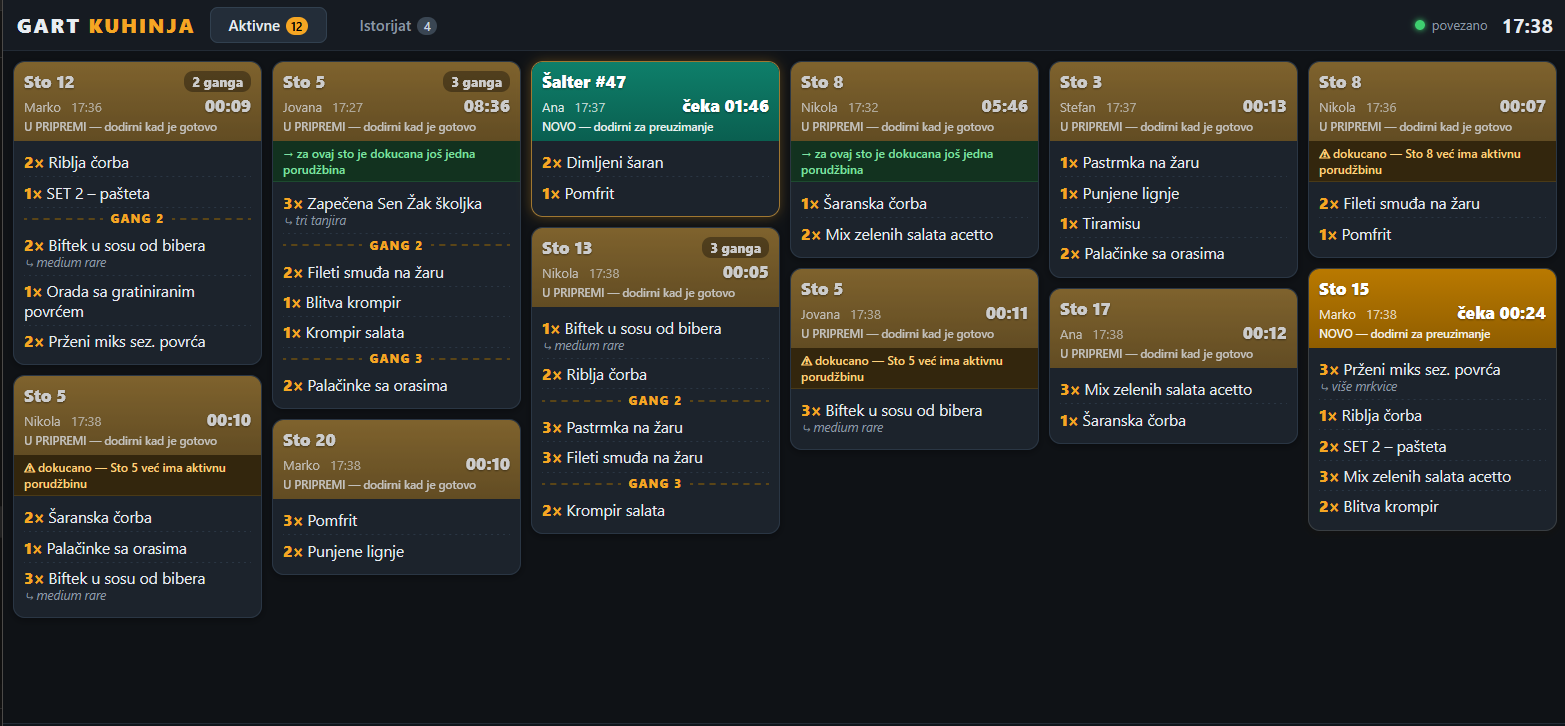
Kitchen display — active orders with courses, timers and a warning for follow-up orders on the same table
Courses instead of chaos
Starters, mains and desserts clearly separated within the same order. The kitchen knows exactly what goes out when, with no shouting across the pass.
A timer on every order
Each card shows how long it has been waiting. You immediately see what is taking too long — before the guest starts complaining.
Follow-up order warning
If a table already has an active order and another one arrives, the system flags it clearly. No more split orders arriving half an hour apart.
Audible alarm until picked up
As long as an order has not been picked up, the sound repeats. Nothing gets lost because nobody looked at the screen.
Waiter screen
When the kitchen finishes, a green card appears at the till with the table and its items. The waiter confirms delivery with a tap — no walking over to the pass "just to check".
History and undo
All completed orders stay in the history. A card closed by accident is restored with a single tap.
The guest gets a number, the screen tells them when it is ready
In venues where guests collect their own food — fast food, bakeries, canteens, food courts — there is no waiter carrying a plate to the table. Along with the receipt, the guest gets a separate slip with an order number, and a screen in the room shows what is being prepared and what is ready for pickup. The same principle used by large fast-food chains. Behind that number sits a whole system: the order is automatically split across production stations and only comes back together once each of them has finished its part.
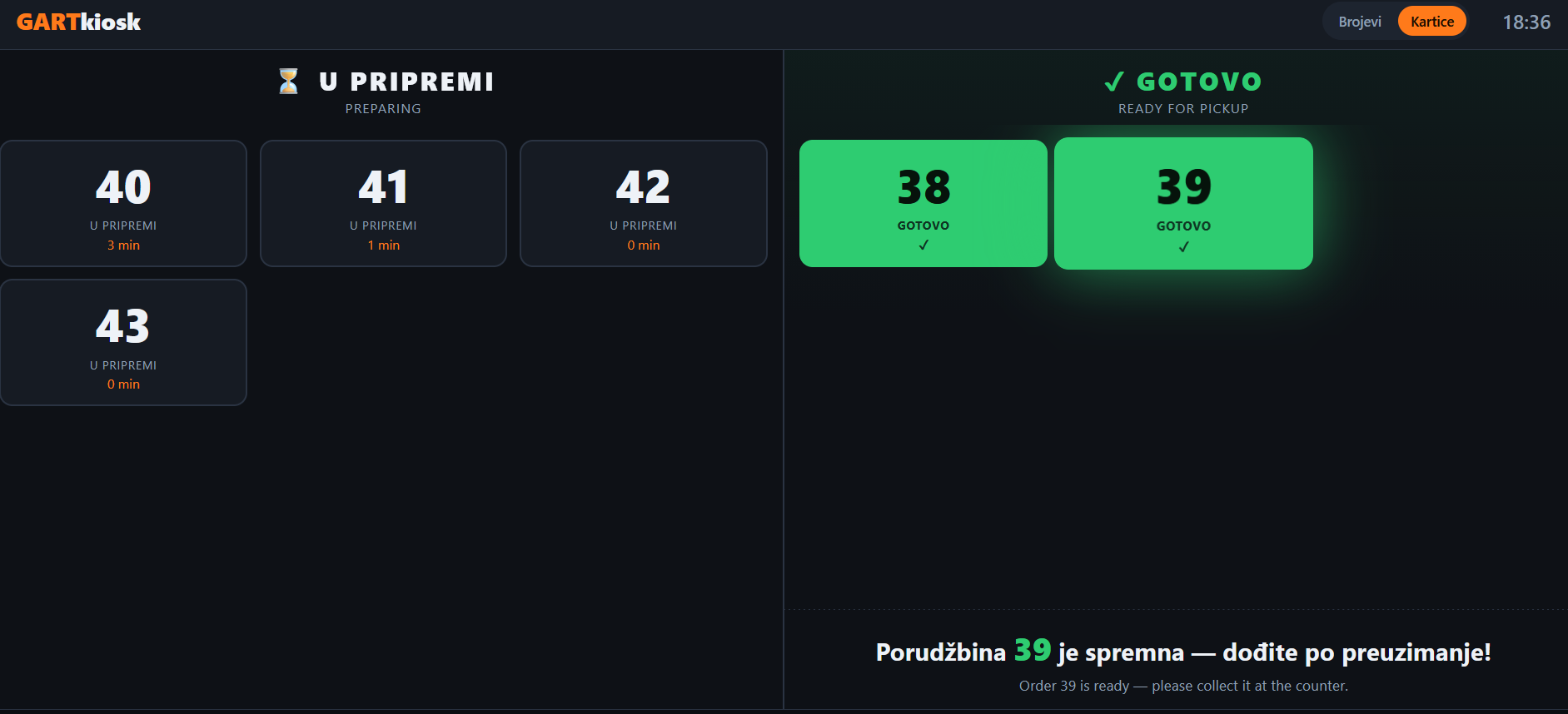
The guest display — numbers being prepared on the left, ready for pickup on the right, with the message shown in two languages
The number is issued at the till
As soon as the order is closed, a separate slip with the number prints after the receipt. It is the only thing the guest has to remember. Numbering resets every day.
Split across production stations
Grill, fryer, oven, cold prep, bar — each station sees only its own part of the order. No cook reading through someone else's items to find their own.
Complete only when every station is done
The system tracks the status of each part separately. An order moves to "ready" only once the last item is finished — the guest never comes up for half a meal.
Two columns instead of calling out numbers
Being prepared on the left, ready for pickup on the right. Each number also shows how long it has been waiting, so guests can see the queue moving. No shouting across the counter.
An audible signal on the switch
When a number moves to the right-hand column, a sound plays. Guests do not have to stare at the screen — hearing it is enough to look up.
Labels in two languages
Column headings and the pickup message are shown in both Serbian and English. Foreign guests need no further explanation.
Guests stop hovering at the counter
Once they see their number being worked on, they sit down and wait. The area in front of the counter stays clear, and staff are not answering "is it ready yet" one guest at a time.
Any TV with a browser will do
The guest screen runs in a browser, just like the kitchen one. No dedicated device, no installation — you open the address on a TV you already have.
The screen is only the part the guest sees. The work is done by the system underneath it — the one that knows which item goes to which station and when an order is genuinely complete.
Delivery, from order entry to the driver
Wolt and Glovo take a significant percentage of every order for advertising and delivery. Sold at dining-room prices, that percentage comes straight out of your margin. That is why every delivery method is separate in the system — with its own prices, its own items and its own prep slip.
Separate prices per delivery method
Wolt, Glovo, your own delivery, counter pickup — each channel has its own price list. The platform's commission is built into the price instead of quietly eating your margin.
No price, no item
If an item has no price defined for Wolt, it is not offered for Wolt at all. Ringing up the wrong item on the wrong channel becomes impossible — the mistake is prevented, not corrected afterwards.
Wolt orders come in on their own
The system supports the Wolt API. Once an order is accepted on the Wolt tablet they provide, it can enter the program automatically — no retyping and no transcription errors.
From there it is the same chain
A delivery order goes through the same steps as one from the dining room: split across production stations, shown on the kitchen displays, tracked through to done.
The slip prints where the order is packed
Once the kitchen and bar have finished their parts, the system sends a slip to print at the production station itself — items, prices and the delivery details. The order gets packed and labelled in the same step.
The till is free the moment the order is entered
Whoever takes orders does not have to track them, wait for them or label them afterwards. They enter the order and move to the next one — from there the kitchen and bar carry it.
The driver finds it done, not in progress
When the slip comes out, the order is packed and labelled. No working out whose is whose, no retyping before setting off. For venues running their own delivery, that is the part of the day worth shortening.
Customer search with order history
A detailed customer search opens the history of their earlier orders — what they ordered and when. Regulars are recognised straight away.
Delivery is not a separate program bolted on the side. It is the same system, with one extra question — which channel the order goes through, and at what price. And from the moment it is entered, the kitchen carries it, not the till.
Lower hardware cost, higher reliability
An Android tablet instead of a Windows machine
The screens run in an ordinary browser. Instead of a dedicated computer with a touch monitor at every station, a cheap tablet is enough — the price difference is severalfold.
Works without internet
Everything runs on your local network. An internet outage does not stop the kitchen.
No stale display
If the connection to the server drops, the screen says so with a clear banner. Once it is back, it resynchronises on its own — it never shows old data as if it were current.
Business benefits
Faster service
Orders reach the kitchen in seconds. Fewer errors in communication between waiters and cooks.
Accurate production
Recipes prevent cooking by feel. Every cook makes the same dish the same way, with the same gram amounts.
Clear picture of profit
Recipes show the real cost price of every dish. Margins are transparent and pricing decisions are based on numbers.
Interested in Gart Restaurant?
Get in touch for a detailed offer and overview of features.